Posting a Job Advertisement via Broadbean

Created by Kylie Wickert, Modified on Wed, 9 Aug, 2023 at 4:35 PM by Kylie Wickert

Each franchisee office has a Job Advertising Account client that is used for job posting. You will need to create a vacant job against the Job Advertising Account client and post this job via Broadbean to the job boards.


National office marketing team will setup your Seek account with appropriate Seek templates with logos to use and each office will be setup to post to Adzuna, Seek and Workforce Extensions website.

If you need to post to other job boards, you will need to reach out to the National office for that job board to be setup for you to post to. 


Step 1.

Login to FastTrack 360

https://workforcexs.fasttrack360.com.au/recruitmentmanager

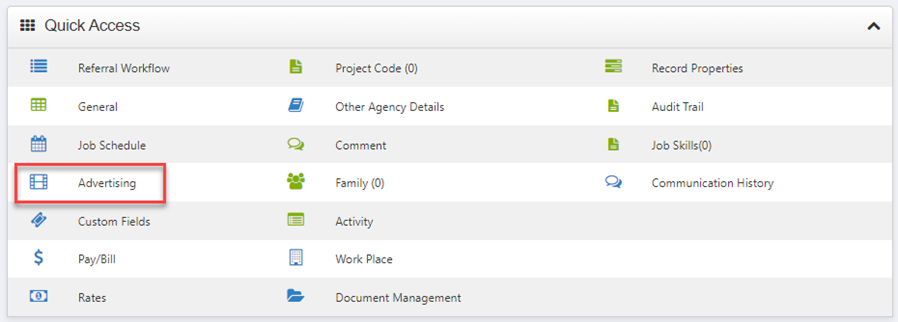
Within the vacant job, go to the Job Advertising section and click Advertise Job
Step 2. Select the questionnaire form to be applied to the job post. There are usually two pages of questionnaires to be applied.
On the first page is applicable to all offices and asks the candidates the questions to the right
  • Contact details
  • Address details
  • Work eligibility
  • Attach resume
  • Attach relevant documents
  • Privacy policy
The second page will have office specific questions to be answered which are tailored to your office by national office.

NOTE: These two sets of questionnaires will apply to all job boards except Seek as Seek doesn’t allow third party system questionnaire to be used. When someone applies to job boards, Seek has its own set of questionnaire.

Step 3.When you click Post, you will be redirected to Broadbean on a separate tab where there are three stages within Broadbean for you to complete:

1. Choose Job Boards

2. Prepare the job advertisement

3. Preview job advertisement and select the appropriate Seek ad type and logo

Step 4.

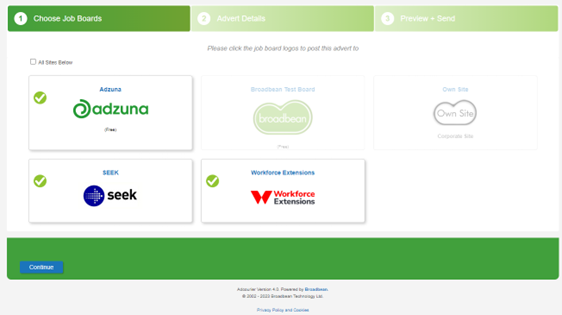
In stage 1 - Choose Job Boards, you will click and select which job boards you want to post to.


Click Continue to stage 2. In the example shown, Adzuna, Seek and Workforce Extensions website are selected.
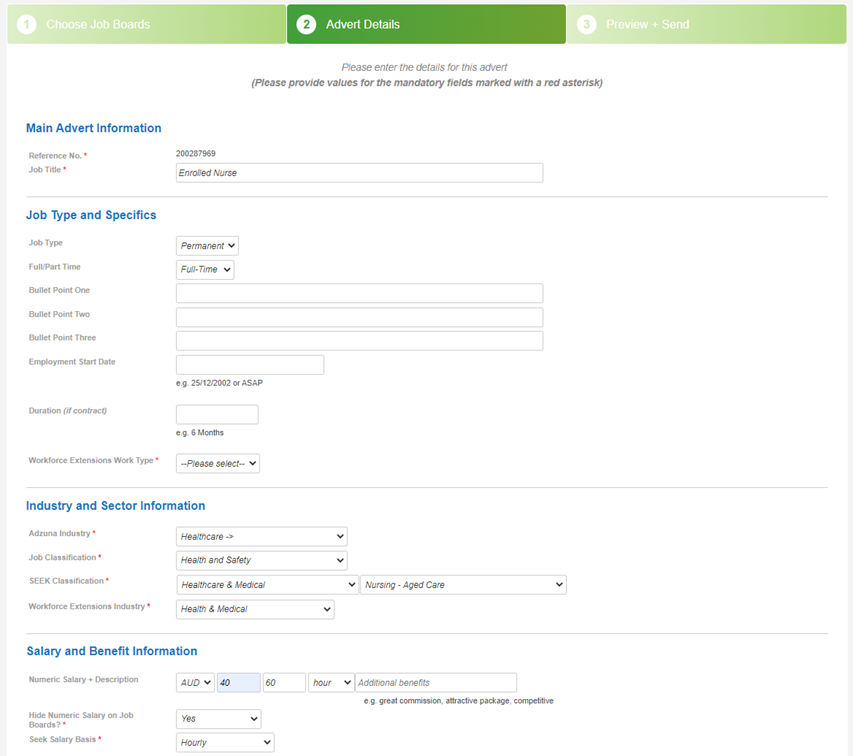
Step 5.In Stage 2 – Advert Details page, anything with red asterisk is mandatory to be completed.
  • Reference No – This is FastTrack job ID
  • Job Title – This is prepopulated as FastTrack job title but you can change the job title before you post
  • Workforce Extensions Work Type – Select either casual, contract, full-time, part-time or temporary
  • Adzura Industry – If Adzura is selected, you will need to select the industry required on Adzure
  • Job Classification – Select the job classification
  • Seek Classification – If Seek is selected, you will need to select the classification required on Seek as well as the position
  • Workforce Extensions Industry – If Workforce Extensions website is selected, you will need to select industry required on Workforce Extensions website
  • Salary and Benefit Information – You will need to enter the min and max rate and select either annum, month, week, day or hour.
  • Hide Numeric Salary on Job Boards – Select Yes or No
  • Seek Salary Basis – Change to either Hourly, Salaried or Salary + Commission
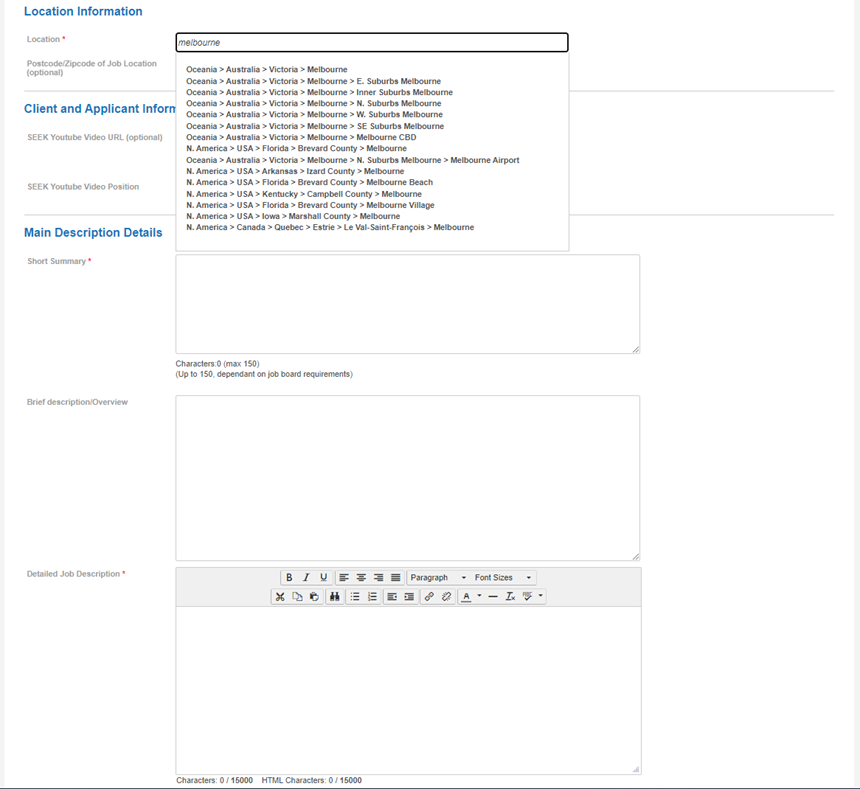
  • Location – type the location name and it will find the best match location name
  • Seek Youtube Video URL and Position – If you have any Youtube video, you can copy and paste the URL here and position it above or below.
  • Short Summary and Detailed Job Description – If you have any texts from Word, it is strongly recommended that you copy the texts from Word to Notepad and from then Notepad to here as it removes any hidden characters from Word otherwise hidden characters might appear on the job advertisement. Then you use the format tool in Broadbean to apply your formatting in Detailed Job Description area.
  • Click Continue when you complete all the above


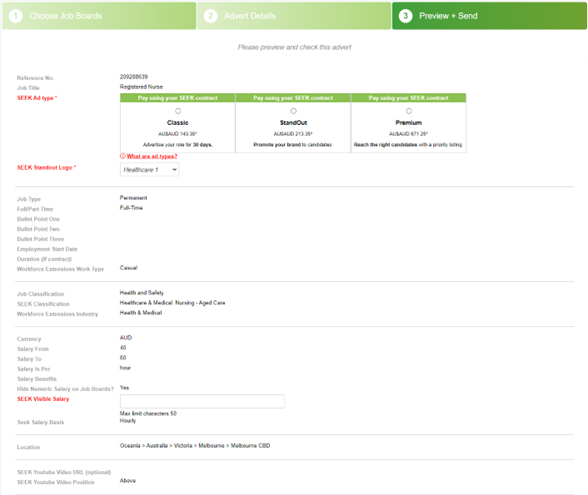
Step 6.In Stage 3 – Preview + Send, you will preview and check the job advertisement
  • Seek Ad Type – Select either Classic, Standout or Premium. Classic doesn’t have logo appearing on the job advertisement which tends to attract less applicants. We recommend you select Standout or Premium to attract more applicants from applying. There are different fees applying to Classic, Standout or Premium type.
  • Seek Standout Logo – The logo names to be selected here are set up by the marketing team at National Office. Please reach out to them if you need to see how the logo looks like.
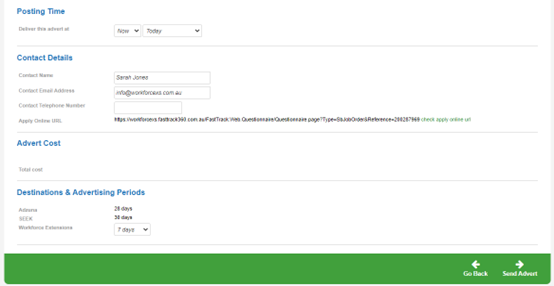
  • Posting Time – If you leave it as Now and Today, it will post immediately but you can also select a specific time and day for this job advertisement to be posted.
  • Contact Details – This doesn’t appear on the job advertisement.
  • Destination & Advertising Period
  • Adzuna – Default to 28 days
  • Seek – Default to 30 days
  • Workforce Extensions – You have the option of 7, 14, 21, 30, 60, 90, 180 or 365 days. 
Step 7.Click Send Avert when all the above is completed and previewed. Depending on the job board you posted, it can take between a few minutes to 2 hours for the job advertisement to appear.
When the candidate applies to the job advertisement, they will be imported as a referral against the referral workflow of the job in FastTrack360. You will then process them by dragging and dropping them through the stages within the referral workflow.


You can go to FastTrack360>Dashboard>Quick Access>Referral Workflow to see the applicants or referrals that have landed in either Applied (if they are new candidate) or Applied Existing (if they are existing candidate who has applied to the job advertisement) or Referral Workflow section of the job you posted from in FastTrack360.


Was this article helpful?

That’s Great!

Thank you for your feedback

Sorry! We couldn't be helpful

Thank you for your feedback

Let us know how can we improve this article!

Select at least one of the reasons
CAPTCHA verification is required.

Feedback sent

We appreciate your effort and will try to fix the article